To view this notification widget you need to have JavaScript enabled. This notification widget was easily created with NotifySnack.
TAMIL INTERNET SECURITY TEAM: windows Blogger Tricks
Showing posts with label windows. Show all posts

How to activate windows 8 / 8.1 to lifetime using the Activator.

  1. Download the Activator from the below given download links.
  2. Extract the downloaded file on the desktop.
  3. Open the Activator as administrator and click beginner Mode.
  4. Select windows 8 from the list.
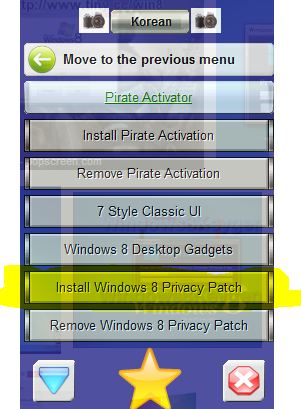
  5. Then select "install pirate activation" from the list.
  6. A command prompt opens, wait for the software to do its work.
  7. If everything goes well, the system reboots.
  8. Wait for the windows to load and then enjoy your activated windows 8.

Screenshots:


Download Links:

Link 1: http://www4.zippyshare.com/v/26520138/file.html

Link 2: http://sh.st/kN93x

Link 3: http://sh.st/kN96p

Firefox is one the most secured web browser in the world. Have you ever dreamed of that we can use Firefox to Hack like a pro? Firefox like other browsers has a feature called add-on. Add-ons adds an additional functionality to your Firefox browser. There are thousands of Firefox add-ons available for Mozilla but Hackingloops brings you the best and most effectiveHacking add-ons ever on Firefox. In short, we are listing a most popular and interesting Firefox add-ons that are useful for Hackers. This list of 11 add-ons vary from information gathering tools to attacking tools. All these add-ons are available for free and you can download from the Mozilla add-on website. So friends lets see what Hackingloops has bring this time for you. I will list them in way from top( I like most) to bottom pattern but note that all of them are extremely good tools.


Firefox Add-ons for Hackers


1. Tamper Data
Tamper data is an great tool to to view and modify HTTP/HTTPS headers and post parameters. We can alter each request going from our machine to destination host with this. Thus it helps in security testing web application by modifying POST parameters. It can be used in performing XSS and SQL Injection attacks by modifying header data. 
Add Tamper data to Firefox:
https://addons.mozilla.org/en-us/firefox/addon/tamper-data/
2. Firebug
Firebug is a nice add-on that integrates a web development tool inside the browser. With this tool, you can edit and debug HTML, CSS and JavaScript live in any webpage to see the effect of changes. It helps in analyzing JS files to find XSS vulnerabilities. It’s an really helpful add-on in finding DOM based XSS for security testing professionals.
Add firebug to your browser :
https://addons.mozilla.org/en-US/firefox/addon/firebug/ 
 
3. Hackbar
Hackbar is a simple penetration tool for Firefox. It helps in testing simple SQL injection and XSS holes. You cannot execute standard exploits but you can easily use it to test whether vulnerability exists or not. You can also manually submit form data with GET or POST requests. It also has encryption and encoding tools. Most of the times, this tool helps in testing XSS vulnerability with encoded XSS payloads. It also supports keyboard shortcuts to perform various tasks.I am sure, most of the persons in the security field already know about this tool. This tool is mostly used in finding POST XSS vulnerabilities because it can send POST data manually to any page you like. With the ability of manually sending POST form data, you can easily bypass client side validations of the page. If your payload is being encoded at client side, you can use an encoding tool to encode your payload and then perform the attack. If the application is vulnerable to the XSS, I am sure you will find the vulnerability with the help of the Hackbar add-on on Firefox browser.
Add Hackbar to Firefox:
https://addons.mozilla.org/en-US/firefox/addon/hackbar/
4. Cookies Manager +
Cookie Manager is one of the greatest tool ever made. Using this tool you can actually play with cookies. You can alter almost all cookie using this tool. You can use Cookies manager to view, edit and create new cookies. It also shows extra information about cookies, allows edit multiple cookies at once and backup/restore them.
Add Cookies Manager to Firefox:
https://addons.mozilla.org/en-US/firefox/addon/cookies-manager-plus/ 

5. NoScript
No Script add-ons greatness is beyond imagination. With this tool you can monitor each an every script running on website, you can block any of scripts and see what actually that scripts does on website. But this add-on is for experts, newbies will face problems using this. Note: If you are testing XSS, HTTPS header modifications, Injection attacks on any website you need to disable this plugin because it will not allow you to do so. 
Add NoScript to Firefox:
https://addons.mozilla.org/en-us/firefox/addon/noscript/

6. Grease Monkey
Grease Monkey is an counter part of No Script, its actually behaves opposite of Noscript. We use Noscript to block the scripts and use GreaseMonkey to run the scripts. It allows you to customize the way a web page displays or behaves, by using small bits of JavaScript. 
Add Grease Monkey to Firefox :
https://addons.mozilla.org/en-US/firefox/addon/greasemonkey/ 

7. User Agent Switcher

User Agent Switcher add-on; adds a one click user agent switch to the browser. It adds a menu and tool bar button in the browser. Whenever you want to switch the user agent, use the browser button. User Agent add on helps in spoofing the browser while performing some attack.
Add user agent Switcher to Firefox:
https://addons.mozilla.org/en-US/firefox/addon/user-agent-switcher/

8. CryptoFox
CryptoFox is an encryption or decryption tool for Mozilla Firefox. It supports most of the available encryption algorithm. So, you can easily encrypt or decrypt data with supported encryption algorithm. This add-on comes with dictionary attack support, to crack MD5 cracking passwords. Although, it hasn’t have good reviews, it works satisfactorily.
Add CryptoFox to Firefox:
https://addons.mozilla.org/en-US/firefox/addon/cryptofox/
9. SQL Inject Me
SQL Inject Me is another nice Firefox add-on used to find SQL injection vulnerabilities in web applications. This tool does not exploit the vulnerability but display that it exists. SQL injection is one of the most harmful web application vulnerabilities, it can allow attackers to view, modify, edit, add or delete records in a database.The tool sends escape strings through form fields, and tries to search database error messages. If it finds a database error message, it marks the page as vulnerable. Hackers can use this tool for SQL injection testing.
Add SQL Inject Me to Firefox:
https://addons.mozilla.org/en-us/firefox/addon/sql-inject-me/ 
10.  XSS ME
Cross Site Scripting is the most found web application vulnerability. For detecting XSS vulnerabilities in web applications, this add-on can be a useful tool. XSS-Me is used to find reflected XSS vulnerabilities from a browser. It scans all forms of the page, and then performs an attack on the selected pages with pre-defined XSS payloads. After the scan is complete, it lists all the pages that renders a payload on the page, and may be vulnerable to XSS attack. Now, you can manually test the web page to find whether the vulnerability exists or not.
Add XSS ME to Firefox:
https://addons.mozilla.org/en-us/firefox/addon/xss-me/
11.  Passive Recon
Last but not the least. Passive recon is a good information gathering tool.  
PassiveRecon provides information security professionals with the ability to perform “packetless” discovery of target resources utilizing publicly available information. It gathers information like DnsStuff tool available on backtrack.

Add Passive Recon to Firefox:
https://addons.mozilla.org/en-US/firefox/addon/passiverecon/


That’s all for today guys, i hope you all are enjoying your journey towards becoming a Professional Hacker. Have fun! Keep Learning.
The Run command is used to directly open an application or document whose path is known.

For using Run commands just open "Run Application" by pressing "Window Button + R"

Run Commands


* Run Commands for Accessories :-


Calculator = calc

Command Prompt = cmd

Microsoft Paint = mspaint or mspaint.exe

On Screen Keyboard = osk

Character Map = charmap

System Information = msinfo32

Connect to a Network Projector = netproj

Connect to a Projector = displayswitch

Sticky Note = stikynot

Windows Explorer = explorer or explorer.exe

Wordpad = write

Presentation Settings = presentationsettings

Remote Desktop Connection = mstsc

Snipping Tool = snippingtool

Ease of Access Center = utilman

Magnifier = magnify

Narrator = Narrator

Internet Explorer = iexplore

Disk Cleanup Utility = cleanmgr

System Restore = rstrui

Windows Media Player = wmplayer

Sound Recorder = soundrecorder

Disk Defragment User Interface = dfrgui


* Run Commands for Computer Management :-


Services = services.msc

Disk Management = diskmgmt.msc

Device Manager = devmgmt.msc

Computer Management = compmgmt.msc

Local Users and Groups = lusrmgr.msc

Performance Monitor = perfmon.msc

Event Viewer = eventvwr.msc

Shared Folders/MMC = fsmgmt.msc

Task Scheduler = control schedtasks

* Run Commands for Administrative Tools :-


Problems Steps Recorder = psr

Registry Editor = regedit or regedt32

System Configuration Utility = msconfig

Direct X Troubleshooter = dxdiag

Group Policy Editor = gpedit.msc

Add Hardware Wizard = hdwwiz.cpl

Local Security Settings = secpol.msc

Resoure Monitor = resmon

Windows System Security Tool = syskey

Windows Version = winver

Windows Firewall with Advanced Security = wf.msc

*Run Commands for Control Panel :-


Control Panel = control

Windows Firewall = firewall.cpl

Create a System Repair disc = recdisc

Date and Time Properties = timedate.cpl

Devices and Printers = control printers

Personalization = control desktop

Screen Resolution = desk.cpl

Folders Options = control folders

Fonts = control fonts

Internet Properties = inetcpl.cpl

Keyboard = control keyboard

Mouse = control mouse or main.cpl

Network Connections = ncpa.cpl

Phone and Modem Options = telephon.cpl

Sound = mmsys.cpl

Volume Mixer = sndvol

System Properties = sysdm.cpl

Autorun virus in Pendrive and Computer in those days are common things. When you plug your pendrive in Computer ,your computer is infected by autorun viruses. So how can you get rid of these viruses without using and paid antivirus.

Autorun virus removal in USB Pen Drives.

Here i give you a trick,with this trick you can remove all autorun virus from Pendrive. So follow the given steps -

How to remove autorun virus using cmd prompt ?


  •   Press ( Windowkey +R) type cmd and press enter.

  •   In Cmd type cd\ for changing directory.

  •  Type in ( attrib -h -r -s autorun.inf ), without brackets and press Enter.

  •  Type ( del autorun.inf ), without brackets and press Enter.

  •   Follow this for all other drives. 


How to remove Shortcut virus from pendrive using cmd  ?


Shortcut make all your files shortcut in your pendrive. This is very annoying thing. If this virus enter your system ,your system is house of shortcuts. Mainly these virus found in pendrive .

 Just follow the below given steps to remove shortcut virus from pen drive.
  • Press ( Windowkey +R) type cmd and press enter.
  • Go to your pen drive directory.(if your pendrive disk name G then type G: and press enter)
  • Type this command: del *.lnk and press Enter.
  • Type attrib -h -r -s /s /d e:\*.*
  • And then press a  Enter.